How to dispute ticket delivery and service fees
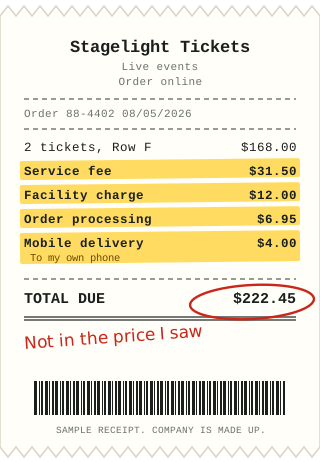
The price you see when you pick tickets is often not the price you pay. Fees for service, facilities, order processing and delivery can add a large share, and they may not show until the final screen.
What to check first
Look at the price on the first page and the total at checkout. Take screenshots of both if you can, and keep the confirmation email. A rule from the Federal Trade Commission on junk fees, which took effect in 2025, generally requires live-event ticket sellers to show the total price, with mandatory fees included, up front. Check whether the price you saw matched what you paid.
Delivery fees for tickets on your own phone
If you were charged for delivery of a mobile ticket, ask what service the fee pays for. Digital delivery to a phone you already own costs the seller very little. You can ask for it to be removed or refunded.
Cancelled, moved or changed events
If an event is cancelled or changed, you may be entitled to a refund of the ticket price, and you can ask about the fees too. Read the seller's refund terms and note the dates.
What to put in your letter
- Your order number, the event and the date you bought.
- The price you saw and the total you paid.
- Each fee you dispute with its amount.
- What you want: a refund of the specific fees.
If they say no
Write to the seller's customer relations, and to the venue if the facility fee goes to them. If you paid by credit card, you can dispute the charge with your card company. Complaints can also go to your state attorney general's consumer office and the Federal Trade Commission.
Want the letter written for you?
Fight That Fee reads your bill, writes your dispute letter, and tells you who to send it to and what to do next. $9.99 to start. Follow-up letters are $2.